
HornetLog – the app for reporting and field work
Anyone who spots an Asian Hornet can report it with HornetLog in seconds – with a photo and location, intentionally without an account. In the field, the app connects the Hivora Sense bait stations and synchronizes the recordings locally – even completely without internet reception.
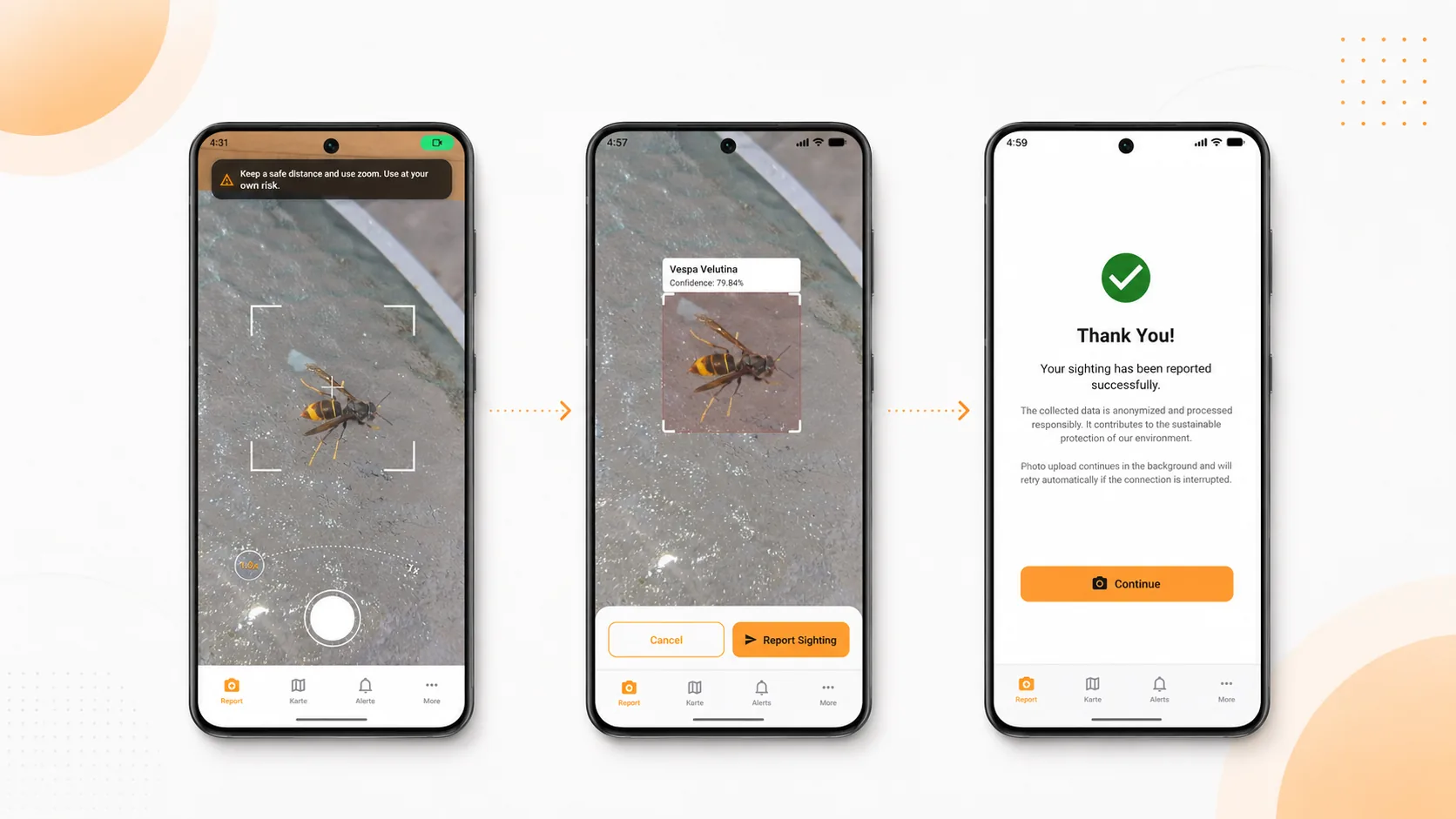
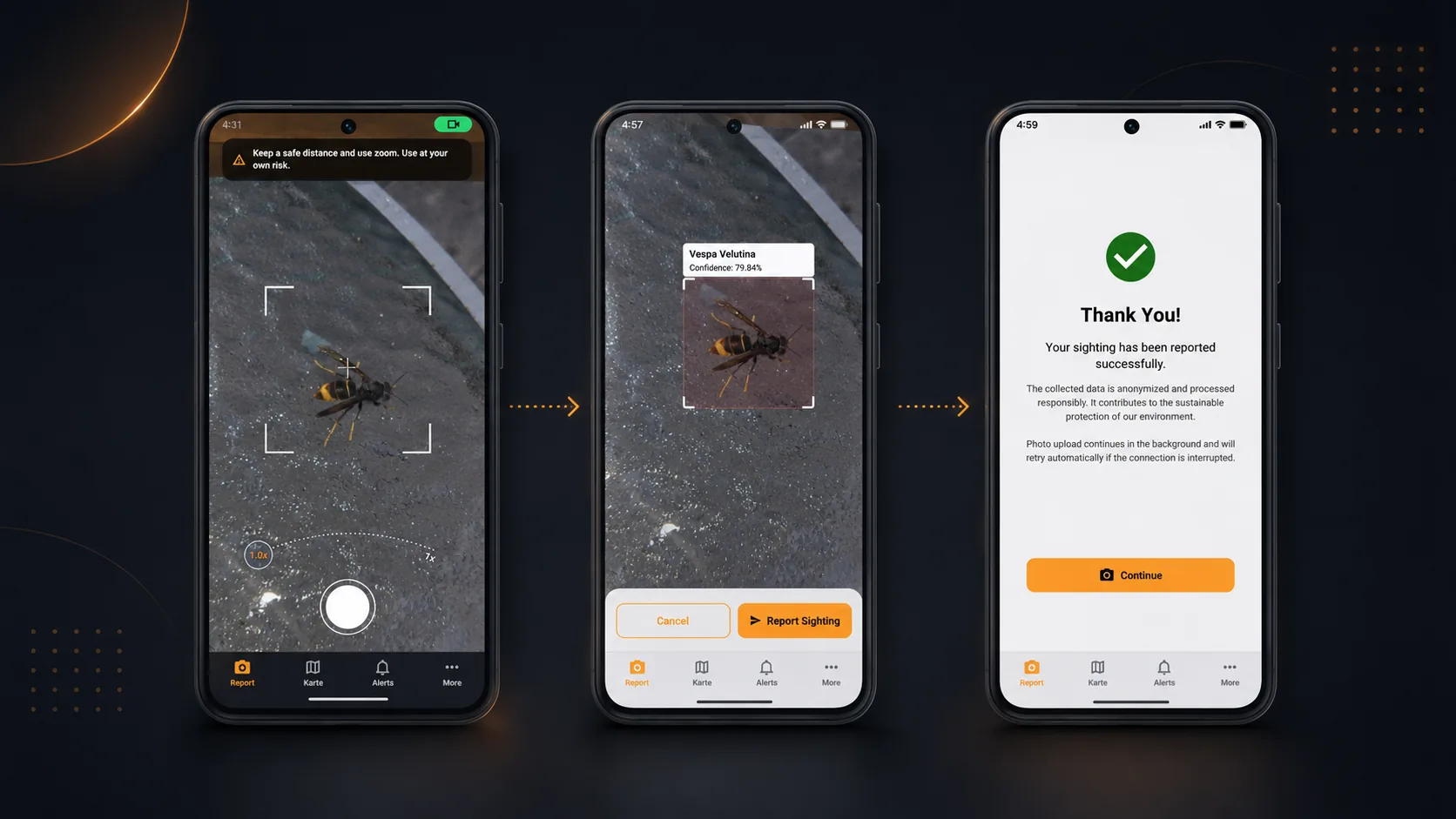
What is HornetLog?
Report in seconds. And then the tool for the field.
HornetLog is the native app in the Hivora system. It turns a sighting into a structured report in seconds – with a photo and location, no account required for the first report. Afterwards you can follow what happens to it. And anyone working outdoors uses the same app to pick up captures from Hivora Sense bait stations – over Wi-Fi or fully offline.
What the app does
Report in seconds
Take a photo, confirm the location, submit – a sighting is reported in under a minute. The first report deliberately needs no account.
Follow the status
After submitting, the app shows what happens to your report – from review to assessment by associations and experts.
Field mode for Hivora Sense
In the field, HornetLog pairs Hivora Sense bait stations, syncs their captures and shows the images on site even without a network – over Wi-Fi or SD card.
Native app for iOS & Android
HornetLog runs natively on your phone – fast, offline-capable and multilingual. The data flows together in a structured way on the Hivora platform.
How it works
From sighting to report in three steps
Photo & location
Photograph the hornet – the app captures the location automatically, adjustable on the map.
Review the detection
The app suggests a classification. You quickly check whether it fits and add details if needed.
Submit & follow
Send the report and follow its status. Everything comes together in a structured way on the Hivora platform.
WHAT YOU GET OUT OF IT EVERY DAY
Not just reporting. Working outdoors.
Watch zones
Save the places you want to keep an eye on — your own apiary, a fellow member's, an orchard. When a confirmed sighting is reported near a zone, the app tells you.
Report a nest – and know who takes it on
In addition to sightings, you can report a found nest. The app shows you participating associations in your region through which your find directly lands in the shared pool. If your region is not covered yet, the app transparently informs you – so no report goes to waste.
Bait stations at the apiary
In the field HornetLog pairs with your Hivora Sense bait stations, collects their captures and shows them to you on the spot — even without a network, over Wi-Fi or SD card.
Highlights
Built for reporting and for the daily work
HornetLog is the free app that connects citizens, associations and professionals in the Hivora system – from the first photo to a nest that gets found.
- Report a sighting with photo and location in seconds
- First report deliberately without an account
- Follow the status of your own report
- Pairing and data retrieval for Hivora Sense stations
- Collect the bait stations' images — over Wi-Fi or from the SD card
- Free, multilingual, for iOS and Android
Frequently asked questions
Questions about HornetLog
What is HornetLog?
HornetLog is the free app in the Hivora system that lets you report an Asian hornet (Vespa velutina) in seconds with a photo and location – the first report needs no account at all.
Is the HornetLog app free?
Yes. HornetLog is free, multilingual and runs natively on iOS and Android.
Do I need a Hivora Cloud user account to report a hornet?
No. Reporting through the HornetLog app is deliberately account-free – take a photo, confirm the location, submit. You only need an account if you want to keep tracking your reports over time or run a Hivora Sense bait station with HornetLog.
How do I report an Asian hornet with HornetLog?
Take a photo of the hornet, confirm the auto-detected location on the map, check the suggested classification and submit – in under a minute. Afterwards you can follow the status of your report.
Does HornetLog work offline?
Yes. In field mode HornetLog pairs with the Hivora Sense bait stations and shows and syncs their captures even without a network connection – via Wi-Fi or SD card.
Which devices does HornetLog run on?
HornetLog is a native app for iOS and Android, available in several languages.
How reliable is the AI?
There is no such thing as 100% certainty with AI, and false detections can never be fully ruled out. The models already deliver reliable results today and are continuously improved – and the more users and reports come together, the sharper the classification becomes.
What data does HornetLog collect?
HornetLog is built to collect as little data as possible. For a sighting report that's the photo and – voluntarily, only with your permission – the location (GPS coordinates) of the sighting. For technical reasons, short-lived server log data is recorded on each access (e.g. IP address, timestamp, device and operating-system type) and automatically deleted after 30 days. Reporting through the app needs no account. All data is processed in a GDPR-compliant way in German data centres. The details are in the HornetLog app's privacy policy.
Can I also report hornet nests with HornetLog?
Yes. Besides individual sightings, you can also report a nest find. HornetLog shows you participating associations in your region, and their reporting form sends your nest find straight into the platform as a ticket. If there is no participating association in your region yet, the app lets you know.
What happens after I submit a sighting?
Your report isn't just stored: an AI assesses from the photo whether it likely shows the Asian hornet (Vespa velutina). For uncertain or ambiguous results, an additional review step follows to ensure higher data quality. You can then track the status of your report.
Will I be notified about new sightings near me?
Yes. You can save observation zones for places you want to keep an eye on. When a new confirmed sighting is reported near a saved zone, HornetLog notifies you right in the app.
Which regions can I use HornetLog in?
HornetLog is currently designed for use in Europe and supports coordinated monitoring in the countries affected by the Asian hornet. Organizations interested in extending it to further regions are welcome to get in touch.
We use cookies and a self-hosted analytics tool to analyse the use of this site anonymously and improve our service. No data is shared with third parties. You can decline the processing or revoke your decision at any time. Details are in our privacy policy. Privacy policy